January 12, 2026 · The Data Product Agent
The PM’s AI Toolkit
Engineers are moving faster than ever. A decent engineer with Cursor can go from spec to working prototype in an afternoon. AI coding assistants have fundamentally changed the pace of software development—not incrementally, but categorically.
The question product people should be asking themselves: Are we keeping up?
Thanks for reading! Subscribe for free to receive new posts and support my work.
If PMs are still spending days on PRDs that engineers can now execute in hours, we’ve become the bottleneck. The old waterfall handoff—PM writes requirements, tosses over wall, waits for build—doesn’t survive this speed shift.
But here’s the thing: “PM” covers at least four different jobs with different daily realities. The AI tools that help a strategic Product Manager aren’t the same as what helps a Product Owner managing sprint backlog, a Data PM wrangling pipeline requirements, or a Project Manager tracking cross-functional dependencies.
This piece covers both—how to match engineering’s new speed, and which tools actually matter based on what you do.
Engineers Aren’t Waiting for Your PRD
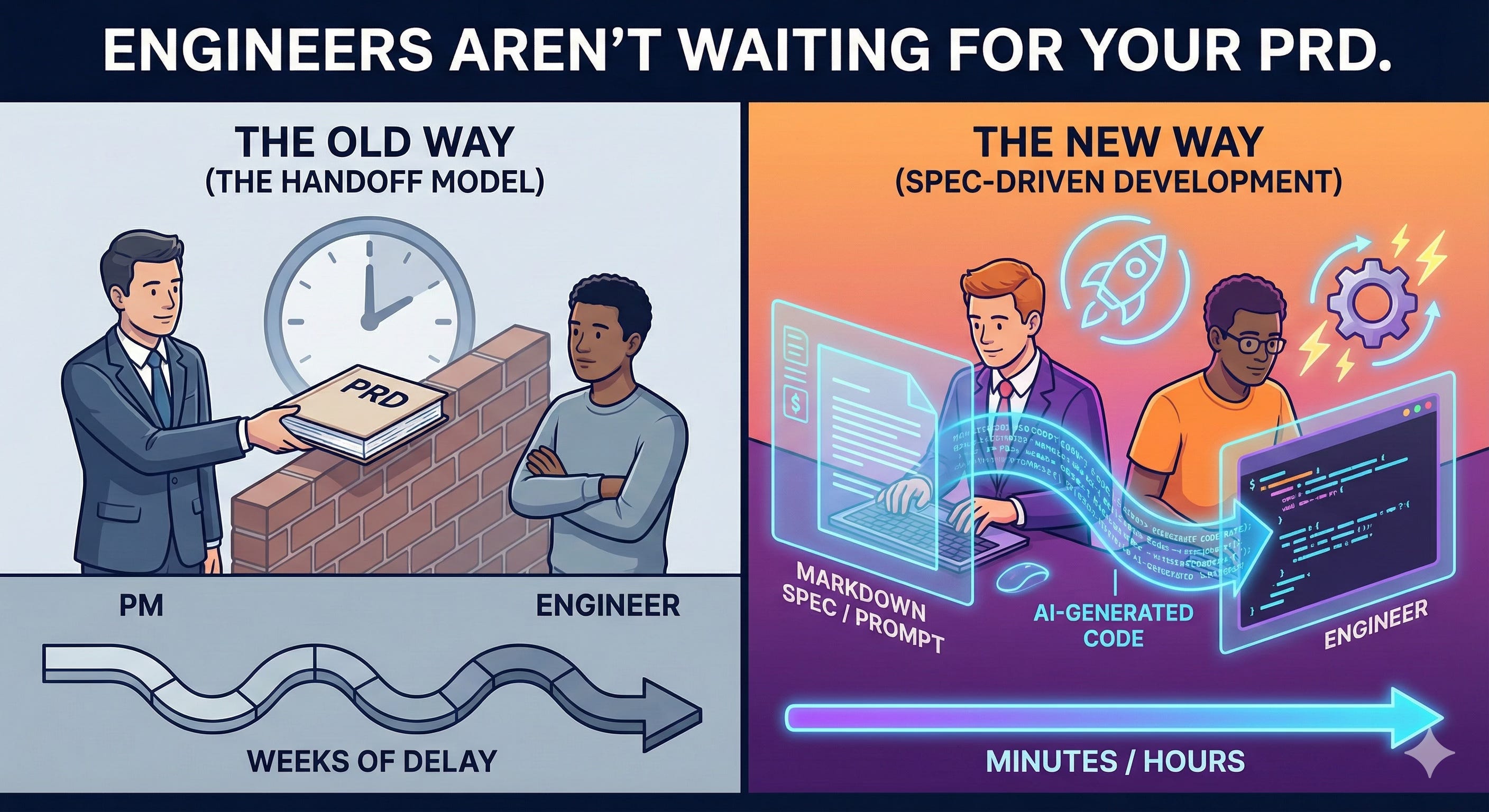
The shift has already happened. It’s not theoretical.
Dennis Yang, Principal PM at Chime, described Cursor as “a much better product manager than I ever was” for PRDs and Jira tickets. He’s using an AI coding assistant—without writing code—to generate documentation, status reports, and user stories faster than he could write them manually.
Product School now lists “proficiency in low-code and no-code development platforms” as an expected PM skill because AI lets you “turn your PRD into a working prototype in minutes.” Lenny Rachitsky’s newsletter has featured PMs describing apps and having them built and deployed by AI in 10-15 minutes. Amazon’s Kiro.dev is pushing “spec-driven development”—you define features and acceptance criteria, AI generates code, tests, and documentation.
Some teams have started including PRDs as markdown files directly in repos so AI coding assistants can reference requirements while generating code. The spec isn’t just documentation anymore; it’s a prompt.
The implication: The handoff model is breaking. When engineering can move this fast, product work that used to be “upstream” is now happening in parallel—or getting skipped entirely.
I’ve watched this shift firsthand. Engineers on my teams aren’t waiting for polished requirements docs. They’re prototyping while we’re still debating scope. The ones who’ve adapted are using AI tools to keep pace—writing specs that AI can execute, building prototypes to test assumptions, reviewing AI-generated code to validate feasibility.
The risk for product people who don’t adapt: you become the meeting-caller, the process-enforcer, the person everyone routes around to ship faster.
Not All “Product People” Are Doing the Same Work
Before talking about tools, we need to clarify the distinctions. Tool recommendations without role context are useless—and most AI tool content treats “Product Manager” as a single job.
It isn’t.
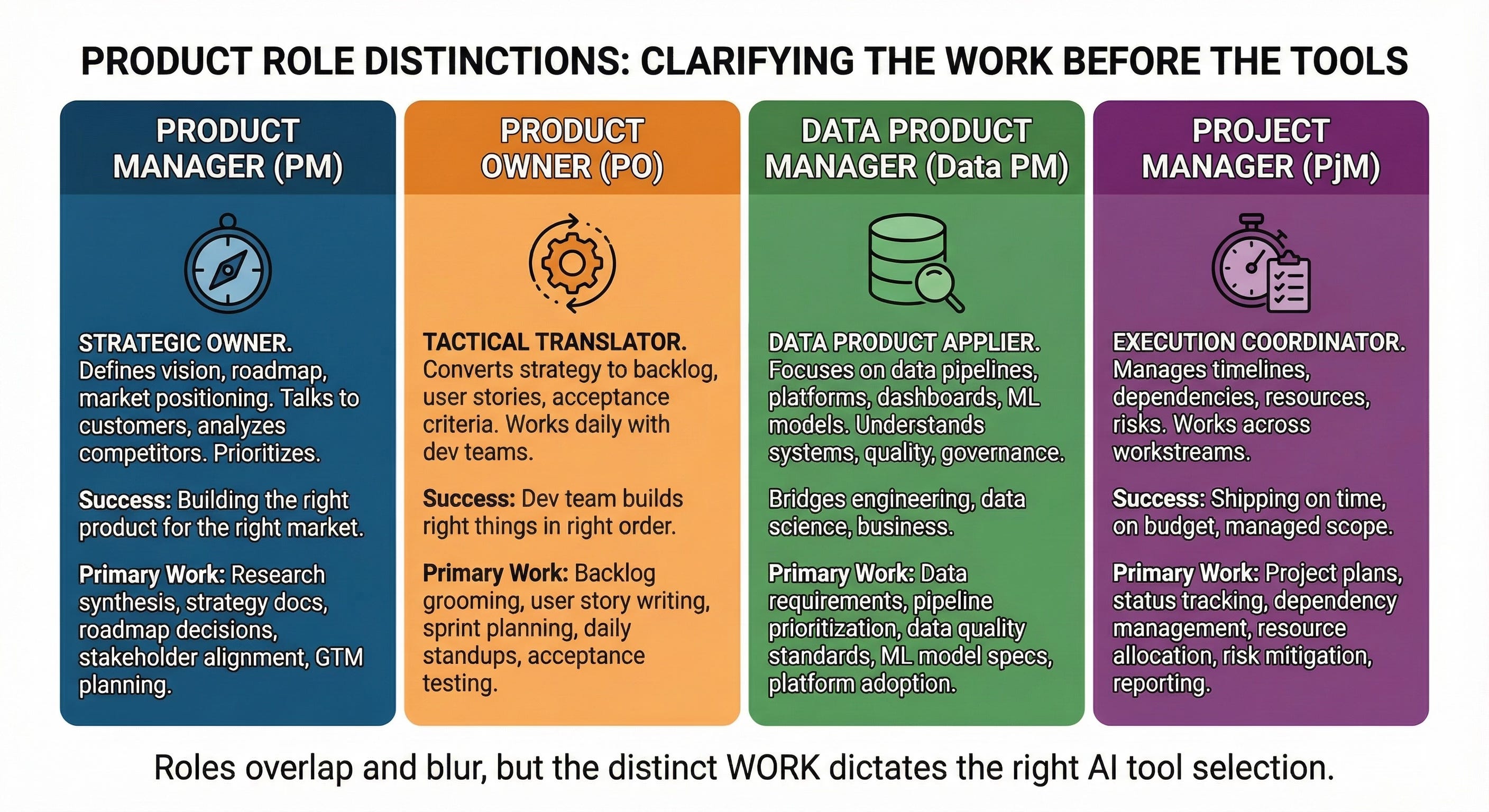
Product Manager (PM)
is the strategic owner of the product. Defines vision, roadmap, market positioning. Talks to customers, analyzes competitors, prioritizes at the theme and initiative level. Success means building the right product for the right market. Primary work includes research synthesis, strategic documents, roadmap decisions, stakeholder alignment, and go-to-market planning.
**Product Owner (PO)** is the tactical translator. Takes PM strategy and converts it to backlog, user stories, and acceptance criteria. Works directly with dev teams daily. Success means the dev team builds the right things in the right order. Primary work includes backlog grooming, user story writing, sprint planning, daily standups, and acceptance testing.
Data Product Manager (Data PM)
Applies the PM role to data products: pipelines, platforms, dashboards, ML models, data APIs. Requires understanding of data systems, quality, and governance. Often bridges data engineering, data science, and business stakeholders. Primary work includes data requirements, pipeline prioritization, data quality standards, ML model specs, and platform adoption.
Project Manager (PjM)
Is the execution coordinator. Manages timelines, dependencies, resources, and risks across workstreams. May work on product projects or non-product initiatives. Success means things ship on time, on budget, with managed scope. Primary work includes project plans, status tracking, dependency management, resource allocation, risk mitigation, and stakeholder reporting.
These roles overlap, blur, and combine depending on org size and structure. Many people wear multiple hats. But the work is distinct, and that’s what matters for tool selection.
When someone asks “what AI tools should PMs use?” the honest answer is: it depends entirely on which of these jobs you’re actually doing day-to-day.
Matching Tools to Actual Work
Now let’s map AI tools to the work each role actually does. I’m being specific about use cases, not just listing tool names.
For Product Managers (Strategic Work)
The leverage is in research synthesis and strategic document creation.
**Claude, ChatGPT, or Gemini** become most valuable when you can upload competitor analyses, user research reports, and market data, then ask for synthesis, pattern identification, and strategic implications. Claude’s large context window makes it particularly useful for processing multiple long documents at once.
I use prompts like: “Here are six competitor product pages, three analyst reports, and our last five customer interview transcripts. What positioning opportunities are they missing that we could own?” The output isn’t a finished strategy—but it surfaces patterns I’d miss reading documents sequentially.
**Cursor or Claude Code for prototyping** is where things get interesting. When you need to validate an idea before writing a full spec, build a rough prototype yourself. Show, don’t tell. This flips the PM/engineering dynamic—you bring a working concept, not a document.
I’ve used Cursor to build throwaway prototypes that answer “would this interaction model even make sense?” before involving engineering. Most of these prototypes get discarded. That’s the point—I’m failing faster and cheaper.
McKinsey data shows PMs using AI tools report 40% faster completion of complex analysis tasks. The leverage isn’t in writing faster; it’s in synthesis and validation that used to take days.
For Product Owners (Tactical Work)
The leverage is in documentation velocity and backlog management.
**Cursor combined with Jira and Confluence** is Dennis Yang’s approach—use Cursor to generate user stories, acceptance criteria, and documentation directly. Don’t write from scratch; prompt, review, refine.
**Claude for user story generation** lets you describe a feature in plain language and get structured user stories with acceptance criteria. Still requires review—AI doesn’t know your context—but cuts the blank-page problem.
Use case: “Based on this feature brief, generate user stories in our standard format with acceptance criteria for the happy path and two edge cases.” The output isn’t perfect, but it’s a starting point that takes seconds instead of thirty minutes.
Product teams report cutting 18 hours per sprint on documentation and manual analysis. That’s real time back for the work that actually matters—clarifying requirements with engineering, testing assumptions, removing blockers.
For Data Product Managers (Data-Specific Work)
The leverage is in technical translation and data documentation.
**Claude Code** lets you run queries, explore data structures, and prototype data transformations. Don’t wait for data engineering to validate your assumptions—check them yourself.
When I’m in Data PM mode, I use Claude Code to answer questions like “is this join even possible given our schema?” before I write requirements that assume it is. This prevents the painful cycle of writing specs, waiting for engineering feedback, revising specs, repeat.
**Claude for documentation** is especially valuable because data products require extensive documentation—schemas, data dictionaries, lineage. AI can draft these from existing sources, then you refine.
Use case: “Here’s our schema definition and this stakeholder’s question about data availability. Draft a response that explains what’s possible and what the constraints are.” The technical translation work that used to take hours now takes minutes.
For Project Managers (Execution Work)
The leverage is in status synthesis and dependency tracking.
**Claude for status reports** lets you feed in updates from multiple workstreams and get synthesized status reports with risk flags. Instead of manually aggregating Slack threads and meeting notes, you prompt and review.
**AI for meeting notes** through tools like Otter.ai or Claude processing transcripts extracts action items, decisions, and blockers automatically. The extraction isn’t perfect, but it’s a starting point that beats manual note-taking.
Use case: “Here are Slack threads from three workstreams. Summarize progress, flag blockers, and identify any dependencies that aren’t being tracked.” This turns an hour of information gathering into a five-minute review-and-refine task.
The Real Change Isn’t the Tools
AI tools matter, but the bigger change is this: the PM role is becoming more technical, not less. Not “learn to code” technical—but “can validate assumptions directly” technical.
When you can build a prototype in Cursor, you don’t need to wait for engineering to know if an idea works. When you can run SQL in Claude Code, you don’t need to wait for analytics to answer a data question. When you can generate a spec that AI can execute, you’re not writing documentation—you’re programming in prose.
This isn’t about replacing engineering or data teams. It’s about removing yourself as a bottleneck by doing the validation work you used to delegate.
The speed asymmetry is real. Engineering has accelerated. Product work needs to accelerate too—not by working longer hours, but by using tools that compress the iteration cycle.
The PMs who thrive in this environment aren’t the ones who learned every tool. They’re the ones who got clear on what work they actually do—and found leverage for that specific work.
Start With Your Actual Job
Before you dive into AI tools, get honest about what you actually do.
If you’re strategic (PM), your leverage is research synthesis and assumption testing. Start with a tool that can process multiple documents and surface patterns you’d miss reading sequentially.
If you’re tactical (PO), your leverage is documentation velocity and backlog quality. Start with a tool that can generate user stories from feature descriptions so you’re editing rather than writing from scratch.
If you’re data-focused (Data PM), your leverage is technical translation and direct data access. Start with a tool that lets you explore data structures and validate feasibility before writing specs that assume things work.
If you’re execution-focused (PjM), your leverage is status synthesis and dependency visibility. Start with a tool that can aggregate updates from multiple sources into coherent summaries.
The tools matter less than the clarity. Start with one workflow that’s slowing you down. Find the AI tool that accelerates it. Learn it well enough to trust it. Then expand.
Engineering isn’t waiting. Neither should you.
Thanks for reading! Subscribe for free to receive new posts and support my work.